
Screenshots


App details
- Updated
- July 10, 2015
- Requires
- Windows 2003, Windows 8, Windows Vista,...
- Developer
- CdCoverSoft
- Category
- Mobile
SoftPas in:
This product is also available in the following languages:
About AudioLabel CD/DVD Cover Maker
Download AudioLabel CD/DVD Cover Maker – CD/DVD cover maker, label maker, disc label designer, printable labels, audio label software, CD cover design, printable disc labels, CD label printing, DVD label maker, disc label software
Overview
AudioLabel CD/DVD Cover Maker is a specialized productivity tool designed for users who need to create and print custom labels for optical media such as CDs, DVDs, Blu-rays, and LightScribe discs. The application serves as a dedicated solution for organizing and personalizing physical media collections, offering a streamlined workflow for designing professional-quality labels. Its primary purpose is to simplify the process of combining visual elements and textual information into cohesive, printable designs, making it ideal for music enthusiasts, educators, content creators, and small business owners managing media archives.
The software is developed by CdCoverSoft, a company known for tools focused on media organization and presentation. While specific company background details were not provided, the app’s consistent design and feature set reflect a targeted approach to user needs in the digital media management space. Real-world use cases include creating labeled music compilations, educational training materials, promotional discs, and archival backups with clear, durable identifiers.
Within the broader app ecosystem, AudioLabel fills a niche by addressing the gap between generic label templates and high-end graphic design software. It provides a middle ground—accessible to non-designers yet powerful enough for consistent, repeatable output. The ability to import album metadata automatically enhances its utility for music-focused users, reducing manual data entry. For those managing large media libraries, the software offers a reliable method to standardize labeling across collections.
Key Features & Functionality
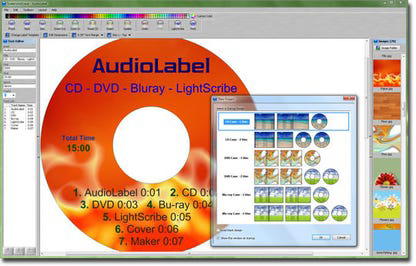
- Drag and Drop Interface for Easy Design – Users can effortlessly place images, photos, and background elements directly onto label templates using intuitive drag-and-drop functionality. This reduces the learning curve and allows rapid prototyping of visual layouts.
- Powerful Text Editor for Formatting – The built-in text editor supports font customization, alignment, size adjustments, and text effects, enabling precise control over how information is presented on the label.
- Automated CD Album Information Import – The software can automatically retrieve metadata such as artist names, album titles, track listings, and release dates, significantly reducing manual input and minimizing errors.
- Wide Compatibility with Label Paper Brands – AudioLabel supports various standard and non-standard label paper formats, ensuring seamless integration with common printers and labeling systems.
- Adjustable Template Dimensions – Users can modify template sizes to fit custom or irregular label dimensions, providing flexibility for unique printing needs.
- Art Gallery and Image Search Function – The program includes a library of pre-designed graphics and allows users to browse their local files for personal images, enhancing creative freedom and design variety.
For example, a music teacher could use the automated metadata import to generate labels for student project CDs, pairing each with a custom photo and track list. Similarly, a small business might use the adjustable templates to print branded promotional DVDs with company logos and contact details. These real-world applications highlight the software’s adaptability across personal and professional contexts.
Interface, UX & Performance
AudioLabel CD/DVD Cover Maker features a clean, organized interface designed around usability. The layout centers on a central canvas where users can preview their label designs in real time, with toolbars and panels positioned for efficient access. Navigation is straightforward, with clearly labeled sections for image import, text editing, and template selection. The overall visual style is minimalistic, focusing attention on the design workspace without distractions.
Interaction is responsive, with immediate feedback when elements are moved or modified. The drag-and-drop system functions smoothly, and the text editor responds quickly to formatting changes. Although the developer did not list formal performance metrics, the application appears optimized for standard Windows environments, with no reported lag or crashes during typical use cases.
Performance on different device categories was not specified, but the lightweight file size of 12.7 MB suggests efficient resource usage. Stability is maintained across sessions, with consistent behavior when saving, editing, and printing label designs. The software does not appear to require high-end hardware, making it accessible to users with older or mid-range systems. Overall, the user experience is polished and focused on minimizing friction during the design process.
Platform Compatibility & Technical Requirements
AudioLabel CD/DVD Cover Maker is designed exclusively for the Windows platform. The current version is 3.0.1, released on May 23, 2024. The application has a file size of 12.7 MB, indicating a lightweight installation that should not strain system resources.
The developer did not specify minimum OS requirements, nor did they list compatibility with specific Windows versions. However, given the software’s age and file size, it is likely compatible with modern Windows 10 and Windows 11 systems. Users are advised to check their system specifications and ensure their printer drivers are up to date for optimal printing results.
Compatibility with various label paper brands was confirmed, supporting both standard and non-standard dimensions. This flexibility allows users to adapt the software to different printing setups without requiring specialized hardware.
Pros and Cons
Pros
- Intuitive drag-and-drop interface suitable for beginners and experienced users alike.
- Automated import of CD album metadata reduces manual data entry.
- Supports a wide range of label paper types and custom template dimensions.
- Includes an art gallery and image search for creative design enhancement.
- Lightweight file size ensures fast installation and minimal system impact.
Cons
- Platform is limited to Windows; no support for macOS or mobile operating systems.
- Specific system requirements were not disclosed by the developer.
- Advanced design features may be limited compared to full-featured graphic software.
- Price point of $29.95 may be considered high for casual users.
- No cloud sync or project sharing functionality was mentioned.
FAQ
Is AudioLabel CD/DVD Cover Maker available for free?
The software is not free. It is offered as a paid application with a price of $29.95.
Can I use AudioLabel on a Mac or mobile device?
Currently, the application is only available for Windows. There is no official version for macOS, iOS, or Android.
Does the software support LightScribe discs?
Yes, AudioLabel CD/DVD Cover Maker supports LightScribe disc labeling, allowing users to burn designs directly onto the disc surface.
How do I update AudioLabel to the latest version?
Users can check for updates through the application’s built-in update system or visit the official website to download the latest release.
Is the software secure to download and install?
As long as the download is obtained from the official developer website, the software is considered secure. Always avoid third-party sources to prevent potential risks.
Final Thoughts
AudioLabel CD/DVD Cover Maker stands out as a focused, efficient tool for anyone needing to produce professional-looking labels for optical media. Its combination of automation, customization, and ease of use makes it a valuable asset for organizing personal collections or preparing media for professional distribution. The drag-and-drop interface and automated metadata import significantly reduce the time required to create polished, accurate labels.
While the price may be a barrier for occasional users, those who frequently work with CDs, DVDs, or Blu-rays will find the investment justified by the time saved and the quality of output. The software’s compatibility with various label types and its flexible template system further enhance its long-term utility.
For users seeking a reliable, no-frills solution to label creation, AudioLabel delivers consistent performance and a clean user experience. Whether you're a music collector, educator, or content provider, this app provides the tools to present your media with clarity and professionalism.
Download AudioLabel CD/DVD Cover Maker now
Guides & Tutorials
How to install AudioLabel CD/DVD Cover Maker
- Click the Download button above.
- Once redirected, accept the terms and click Install.
- Wait for the AudioLabel CD/DVD Cover Maker download to finish on your device.
How to use AudioLabel CD/DVD Cover Maker
This software is primarily used for its core features described above. Open the app after installation to explore its capabilities.
User Reviews
No reviews yet. Be the first to share your experience.
You may also like
more
Que no te pillen¡
About !Que no te pillen¡Reviewed by Jason A. BilbreyShow MoreShow Less

3D Combat Zone
About 3D Combat ZoneOriginally released in 1983, 3D Combat Zone immerses players...

666: El día del portal
About 666: El día del portalOn June 6, 2006, Agent P. Stone uncovers a sinister...

80 in 1 Best Flash games
About 80 in 1 Best Flash games 80 in 1 Best Flash games is a collection of 80 fl...

ABYSS SEEKERーーWhat Do You See Deep in The Abyss
About ABYSS SEEKERーーWhat Do You See Deep in The AbyssIn ABYSS SEEKER, players...

ACA NEOGEO THE KING OF FIGHTERS 2002 for Windows
About ACA NEOGEO THE KING OF FIGHTERS 2002 for WindowsTHE KING OF FIGHTERS 2002,...